HPRC Framework
HTML Prompt Response Construction
Declarative AI rendering for web applications.
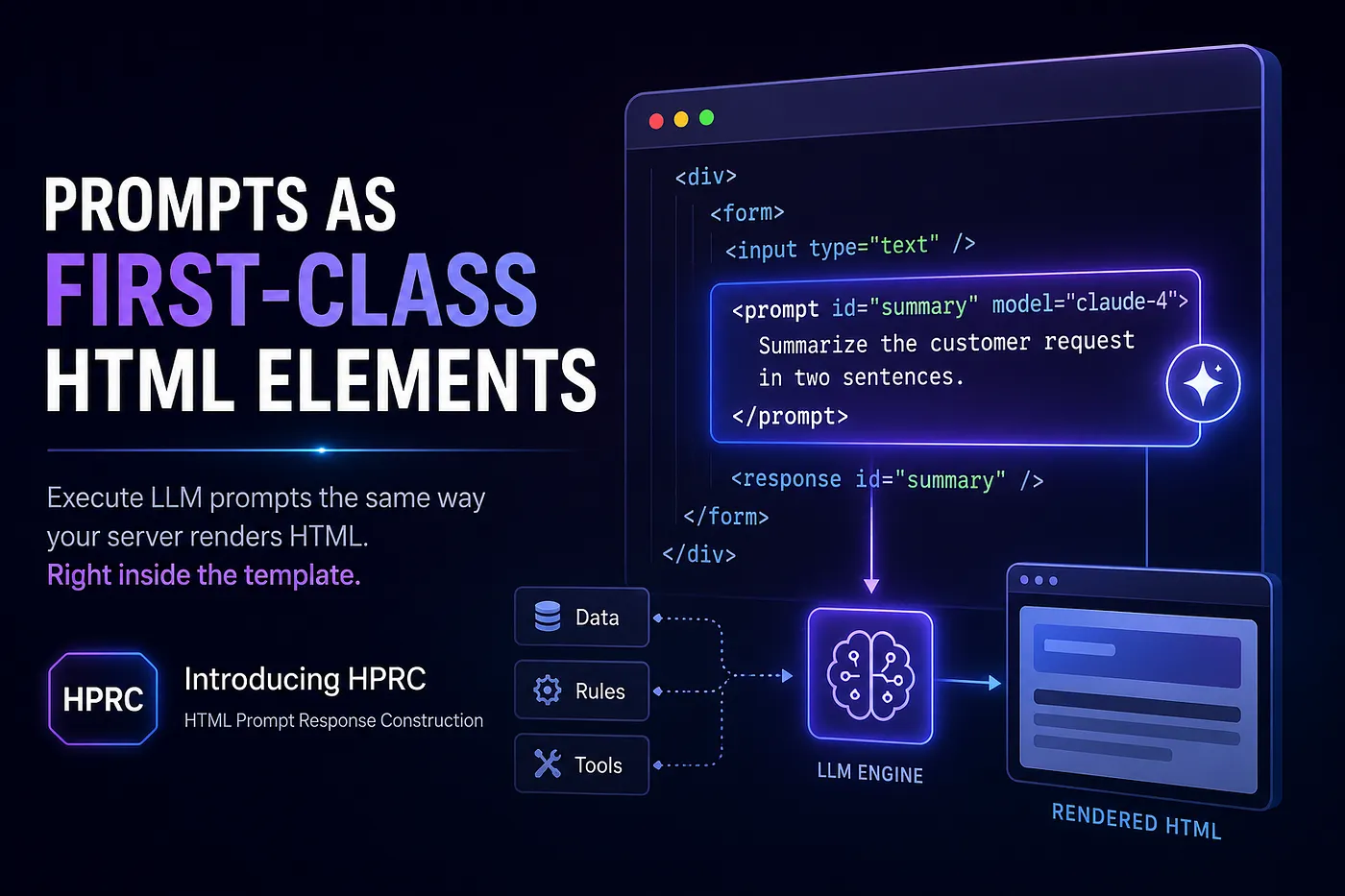



pip install hprc-frameworkAn open-source framework for declarative AI rendering. Write
SPREP templates — HTML with embedded
<prompt> / <response> elements —
and let the HPRC Framework handle prompt construction,
dependency resolution, rule evaluation, tool invocation, caching, async
execution, and response rendering.
HPRC Framework
    ↓ supports
SPREP Templates   (Simple Prompt Response Embedded Pages)
Developers write SPREP templates. The HPRC Framework renders them.
Created by Rajesh Ramani ·
hprcframework.dev
Status: open source under Apache-2.0, early release
0.1.0(Alpha). Created by Rajesh Ramani ·hprcframework.dev.
📖 Browse the HTML docs: open
docs/index.htmlin a browser — a styled User Guide (with examples), an Architecture & Design page, an HTML version of this README (README.html), and the SPREP language spec. All pages work offline except the Architecture page, which loads Mermaid from a CDN to draw its diagrams. (README.html is generated from Markdown withpython docs/build.py, which needs pandoc.)
📐 The SPREP template language has its own specification:
sprep/sprep-spec.md(HTML). HPRC is its reference implementation.
What is HPRC? (in one minute)
Modern web pages increasingly want AI‑written pieces — a personalized greeting, a summary, a recommendation. Today you usually build those by writing Python that calls a language model, stitches the text together, and drops it into the page. The AI logic ends up scattered across your codebase, far from the page it belongs to.
HPRC flips that around. You write a normal HTML page and, right where you want AI text to appear, you drop in two things:
- a
<prompt>— the instruction for the model, and - a
<response>— the spot where the model's answer should appear.
When the page renders, HPRC runs the prompts for you and fills in the
answers. The <prompt> blocks themselves never appear
in the final page — only their answers do.
A helpful way to picture it: mail‑merge, but for AI. Your template has blanks; HPRC fills them — except the "blanks" are written by a language model that can read your data.
A tiny example:
<h1>Hello <fill>customer.name</fill></h1>

<prompt id="welcome">Write a one-line welcome for <fill>customer.name</fill>.</prompt>
<response id="welcome"/>
Your Python code supplies the data (customer.name) and
picks the model; HPRC does the rest.
Why it exists
Most "LLM + web" code today is imperative glue: you receive a request, hand‑build prompt strings in Python, manually sequence dependent calls, await them, and splice the text into a template. The orchestration logic lives far away from the page it produces — which makes it hard to read, change, and reason about.
HPRC inverts that. The template becomes the source of truth:
- The page author writes prompts inline, next to where their output will appear.
- The application developer supplies only data
and policy — a
bindingsdict, named rules, allowlisted tools, an LLM provider, and a cache — through a singleHPRCConfig. - HPRC does the orchestration for you: resolving data, deciding which prompts run, working out their order, executing them, caching, and stitching everything into the final HTML.
Principles it sticks to
- Integrates with any web framework — use it with FastAPI, Flask, or Django, or run it standalone. HPRC never imports a web framework; it just normalizes whatever request object you pass into a plain namespace.
- Works with any model provider — OpenAI, Anthropic,
Gemini, local models, or your own. Each is a tiny adapter behind one
generate(...)method. - No logic or expressions in templates — business rules stay in Python. Templates only name rules and tools; the actual predicates and functions live in your app.
- Tools that actually run — when a prompt declares tools, HPRC executes the ones the model calls (with the model's arguments) in a single iteration, feeds results back, and renders the model's next answer. (A multi-step agent loop is on the roadmap.)
How it works (the short version)
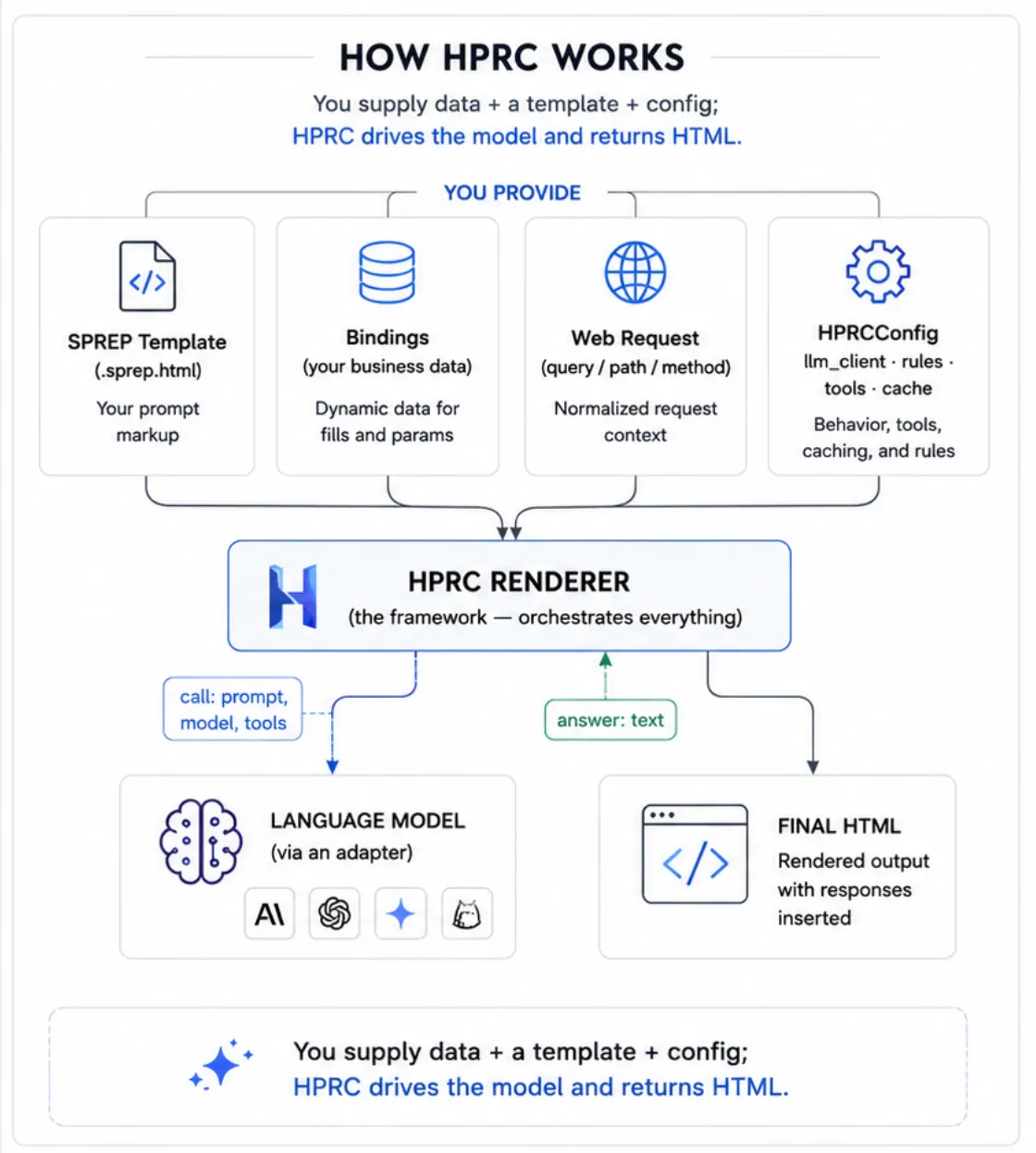
You hand HPRC four things — a template, your data
(bindings), the web request, and a config — and it hands
back finished HTML. In between, one render goes through a few clear
stages: it reads the template, decides which prompts should run, works
out their order (some prompts depend on others), runs them, and stitches
the answers back into the page.
Inside the renderer, one pass runs a short, clear pipeline:
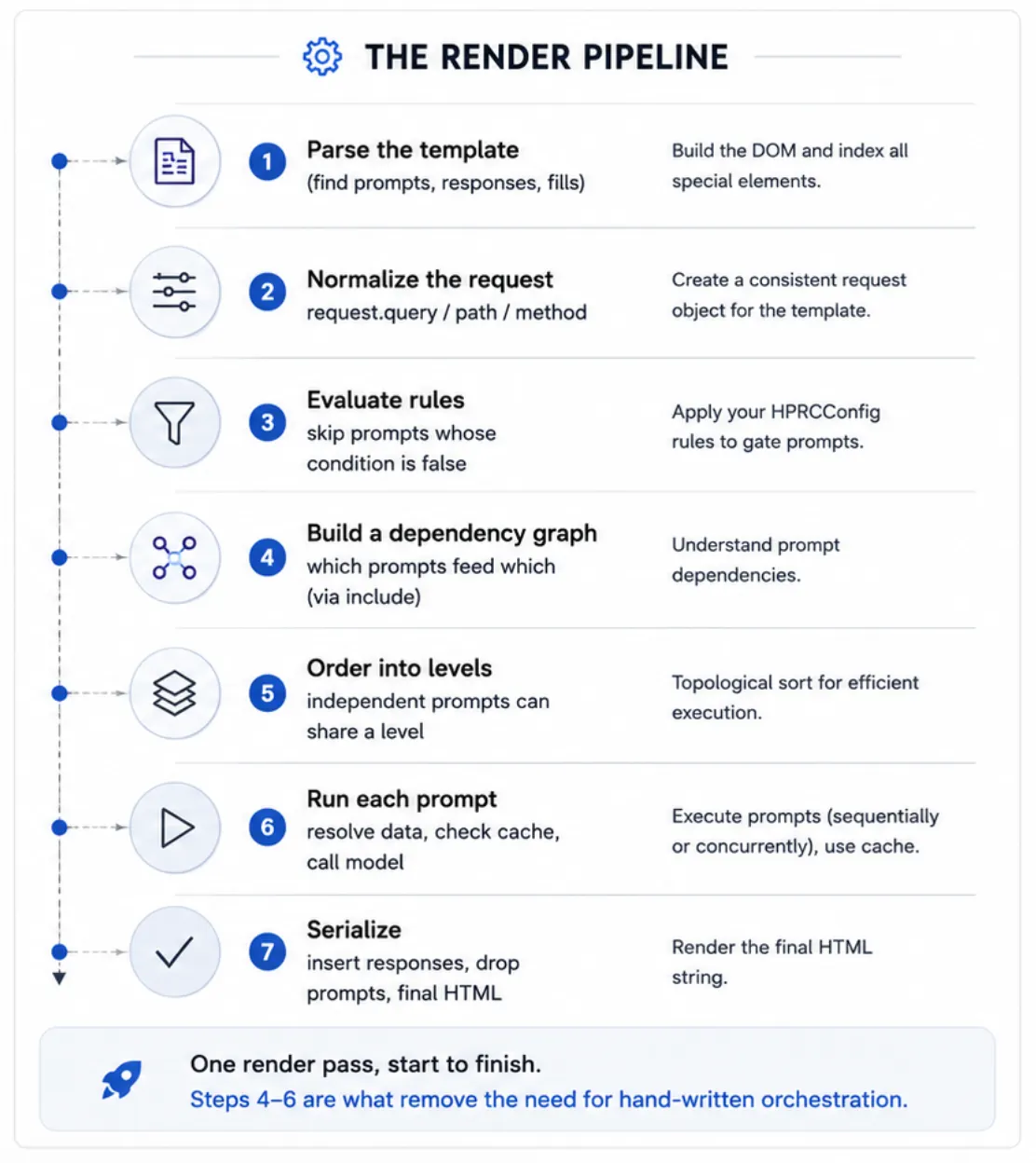
The renderer (hprc/renderer.py) is the part that
coordinates all this. Everything flowing through it is described by
plain data models (hprc/models.py), which keeps the rest of
the library simple and declarative. For the full step‑by‑step, see the
Architecture doc.
Install
From PyPI:
pip install hprc-framework # core (just pydantic) — then: import hprcOptional provider / framework extras:
pip install "hprc-framework[anthropic]"   # Claude provider (anthropic)
pip install "hprc-framework[openai]"      # OpenAI / Ollama provider
pip install "hprc-framework[gemini]"      # Gemini provider
pip install "hprc-framework[fastapi]"     # FastAPI example (fastapi, uvicorn)
pip install "hprc-framework[all]"         # every provider SDK
The only required runtime dependency is
pydantic>=2.0; provider SDKs are optional and lazily
imported. Requires Python >=3.9.
From source (for development):
git clone https://github.com/HPRCFramework/hprc-framework
cd hprc-framework
python -m venv .venv && source .venv/bin/activate
pip install -e ".[dev]"               # editable install + tests
python -m pytest -q
Quick Start
HPRC's public entry points are async coroutines. Run
them inside an event loop. The default provider is the offline
MockLLMClient, so this needs no API key.
MockLLMClientis for tests, demos and local development — not production. It never calls a real model; it just echoes a summary of each request so you can develop and assert on prompt construction offline. For real generated output, swap in a real provider (OpenAIClient,AnthropicClient,GeminiClient,OllamaClient) — see Shipped providers.
import asyncio

import hprc
from hprc import MemoryCache, MockLLMClient, HPRCConfig

TEMPLATE = """<!DOCTYPE html>
<html><body>
  <h1>Hello <fill>customer.name</fill> (<fill>customer.tier</fill>)</h1>

  <prompt id="summary" model="gpt-5" condition="is_premium" temperature="0.2" cache="24h">
    Customer <fill>customer.name</fill> is interested in <param>product</param>.
    Write a one-line account summary.
  </prompt>

  <prompt id="upsell" model="gpt-5">
    Given: <include response="summary"/>
    Suggest one upsell.
  </prompt>

  <section><h2>Summary</h2><response id="summary"/></section>
  <section><h2>Upsell</h2><response id="upsell"/></section>
</body></html>"""


async def main():
    config = HPRCConfig(
        llm_client=MockLLMClient(),
        rules={"is_premium": lambda ctx: ctx["customer"]["tier"] == "premium"},
        tools={},
        cache=MemoryCache(),
    )
    html = await hprc.render_template_string(
        template_html=TEMPLATE,
        request={"query": {"product": "WidgetPro"}, "path": {}, "method": "GET"},
        bindings={"customer": {"name": "Ada", "tier": "premium"}},
        config=config,
    )
    print(html)


if __name__ == "__main__":
    asyncio.run(main())
(This is examples/standalone.py — run it with
python examples/standalone.py.)
upsell depends on summary via
<include response="summary"/>, so HPRC runs
summary first and substitutes its (mock) response into
upsell's prompt automatically. The
<prompt> blocks never appear in the output.
Entry points
All defined in hprc/renderer.py and re-exported from
hprc:
| Function | Use |
|---|---|
await render_template(template_path, request=None, bindings=None, config=None) |
Render a .sprep.html file. |
await render_template_string(template_html, request=None, bindings=None, config=None) |
Render template HTML supplied as a string (no file I/O). |
await render_string(template, request=None, bindings=None, config=None) |
Render an already-parsed TemplateDefinition. |
Renderer(config).render(template, render_context) |
The low-level object API. |
If config is omitted, a default
HPRCConfig() is used (mock client, in-memory cache, no
rules/tools).
Your
data: bindings (from your code) and request
(from the web)
This is the part most people want to understand first: how do my own values get into a prompt or the page?
You hand HPRC a plain dictionary called
bindings when you render. Anything in it
is available to both your HTML and your prompts through
<fill>. Typically your Python business logic
produces that dictionary — querying a database, calling
services, computing derived values — and passes it in:
# your business logic produces a plain dict (JSON-like)
def build_customer_bindings(customer_id):
    record = load_customer(customer_id)          # e.g. from a database
    age    = compute_age(record["dob"])          # a derived value
    return {"customer": {"name": record["name"], "age": age,        # 55
                         "segment": "senior" if age >= 55 else "standard"}}

html = await hprc.render_template(
    template_path="customer_profile.sprep.html",
    bindings=build_customer_bindings("1001"),      # <-- your data flows in here
    config=config,
)
Now the same customer.age is usable in the page
and in a prompt, from the template file:
<p>Age: <fill>customer.age</fill></p>                              <!-- shown in the HTML -->
<prompt id="hi">Greet this <fill>customer.age</fill>-year-old customer.</prompt>
There are two namespaces, and
<fill> reads from both:
| Namespace | What it holds | How you read it |
|---|---|---|
bindings |
your business‑logic data / computed values | <fill>customer.age</fill> |
request |
the incoming web request | <fill>request.query.product</fill>, or the
shortcut <param>product</param> |
📂 A complete, runnable version of this — business logic →
bindings→ one template used by both the HTML and a prompt — is inexamples/customer_profile.pyandexamples/templates/customer_profile.sprep.html. Run it withpython examples/customer_profile.py.
What you get back: an HTML string (you send it to the response)
render_template(...) is an async function
that returns a str — the finished HTML.
HPRC never touches the HTTP response; it's a templating
engine, not a web framework (it deliberately never imports
FastAPI/Flask/Django). You put the string on the wire —
which is exactly what lets HPRC drop into any stack:
html = await hprc.render_template(...)   # -> str (the finished page)

return HTMLResponse(html)                # FastAPI / Starlette
return html                              # Flask  (or Response(html, mimetype="text/html"))
return HttpResponse(html)                # Django
open("out.html", "w").write(html)        # no framework — write a file, or print(html)
Symmetrically, the request is data you pass
in via request= — either a framework request
object (FastAPI/Starlette/Flask/Django) or a plain
{"query": ..., "path": ..., "method": ...} dict. HPRC reads
only query params, path params and method from it;
headers, cookies and body are not consulted (put anything else in
bindings).
So the whole contract is: (optional request +
bindings) in → HTML string out. The HTTP request
and response objects stay entirely in your framework code.
Template Syntax Reference
A SPREP template is ordinary HTML plus a handful of special elements.
The parser (stdlib html.parser) preserves text, entities,
comments, the doctype and self-closing/void elements so the document
round-trips faithfully.
<prompt> —
executable, tacit
Defines an LLM call. Its body is the prompt text (resolved at render time). It is never rendered into the output.
<prompt
    id="summary"
    model="gpt-5"
    condition="is_premium_customer"
    temperature="0.2"
    max_tokens="500"
    cache="24h"
    async="yes"
    tools="crm_lookup,pricing_engine">
  You are a concise account analyst.
  Customer: <fill>customer.name</fill> (tier: <fill>customer.tier</fill>)
  Product of interest: <param>product</param>
  Write a 2-sentence summary.
</prompt>
Attributes (see PromptDefinition /
_build_prompt in hprc/parser.py):
| Attribute | Type | Default | Meaning |
|---|---|---|---|
id |
string | required | Identifier; the matching <response id="...">
renders this prompt's output. Duplicate ids raise
ValueError. |
model |
string | None |
Passed through to the provider (provider falls back to its own default). |
condition |
string | None |
Name of a registered rule; the prompt only runs if the rule returns truthy. |
temperature |
float | None |
Forwarded to the provider. |
max_tokens |
int | None |
Forwarded to the provider. |
cache |
string | None |
TTL spec like "24h", "30m",
"3600". Absent/empty = no caching. |
async |
bool | no |
Sequential by default; set async="yes" to run this
prompt concurrently with other async prompts in its level.
Truthy values: yes, true, 1,
on. |
tools |
csv | empty | Comma-separated allowlist of registered tool names. |
<response>
— placeholder, with render
Where a prompt's output is injected, bound by id.
<response id="summary"/>            <!-- rendered (default) -->
<response id="summary" render="yes"></response>
<response id="audit" render="no"/>  <!-- executed, but NOT shown -->
render="no" (also false, 0,
off) means the prompt still executes and
its response is still available to other prompts via
<include>, but it is not written into the page.
Useful for intermediate/internal prompts.
<fill> — data,
dot-notation
Resolves a dotted path against the namespace
{**bindings, "request": request} and writes it
(HTML-escaped) into the page.
<h1><fill>customer.name</fill></h1>
<p>Account #<fill>request.path.customer_id</fill></p>
Dot paths (resolve_path in
hprc/request_context.py) traverse dict keys, object
attributes and integer list indices (items.1). A missing
segment yields an empty string, so templates degrade gracefully. In page
output, <fill> is HTML-escaped (e.g.
<script> → <script>);
inside a prompt body it is inserted raw.
<param> —
request query shortcut
Shorthand for request.query.<name>:
Viewing product: <param>product</param><param>product</param> is exactly
<fill>request.query.product</fill>. Missing
params resolve to an empty string.
request namespace
HPRC normalizes any request object into a stable shape
(normalize_request):
{ "query": {...}, "path": {...}, "method": "GET" }Address it from fills: request.query.*,
request.path.*, request.method. Accepted
inputs:
None→ empty namespace.- A plain dict already shaped
{"query": ..., "path": ..., "method": ...}. - A FastAPI/Starlette
Request(usesquery_params,path_params,method). - Any object exposing
query/path/methodorquery_params/path_params/method.
<include> — compose
prompts
Used inside a prompt body to splice in another prompt's response or constructed text:
<prompt id="upsell">
  Given this summary: <include response="summary"/>
  Suggest one upsell.
</prompt>| Form | Inside a prompt body | In page output |
|---|---|---|
<include response="X"/> |
inserts prompt X's response text |
inserts X's response (alias for
<response id="X"/>) |
<include prompt="X"/> |
inserts prompt X's constructed prompt
text |
nothing (it is a prompt-construction directive only) |
<include> is what creates dependency edges in the
graph (see below).
Rules
Rules keep business logic out of templates. A template references a
rule by name only via condition="..."; the
predicate lives in Python and is supplied through
HPRCConfig.rules.
config = HPRCConfig(
    llm_client=MockLLMClient(),
    rules={"is_premium_customer": lambda ctx: ctx["customer"]["tier"] == "premium"},
)<prompt id="summary" condition="is_premium_customer"> … </prompt>
<section><response id="summary"/></section>How HPRC uses a rule
A rule is a per-prompt gate — it does not decide whether the renderer runs (the renderer always runs). It decides whether one prompt runs.
At the start of each render, HPRC walks every
<prompt>. For a prompt with
condition="is_premium_customer" it:
- looks up
is_premium_customerinHPRCConfig.rules; - calls it with the bindings dict (so the function's
ctxargument is yourbindings— note: bindings, not the request); - coerces the result to a bool.
If it's truthy, the prompt runs (the model is called
and its <response> is filled). If it's
falsy, the prompt is skipped — no
model call — and its <response> renders
empty (and any
<include response="summary"/> of it resolves to
""). A prompt with no
condition always runs.
One rule per prompt — no AND/OR in templates
Each prompt has at most one condition, and HPRC
evaluates each prompt's condition independently, up
front. There is deliberately no expression language in
templates — you can't write condition="a and b". For
compound logic, put it inside one rule function:
rules={
    "is_premium_customer": lambda ctx: ctx["customer"]["tier"] == "premium",
    "eligible_for_upsell": lambda ctx: (
        ctx["customer"]["tier"] == "premium" and ctx["account"]["balance"] > 0
    ),
}
The rules dict can hold many named rules; different
prompts pick different ones by name (hprc/rules.py).
Signature and error behavior
- Signature:
Callable[[dict], bool], receiving the render bindings (not the request). - A missing/unregistered rule name is a configuration
mistake and fails loudly — the render raises
RuleErrornaming the prompt and the rule (so a typo incondition=is caught, not silently ignored). - A rule that runs but raises (e.g. the bindings lack
a key it reads) is treated as "condition not met" → that one prompt is
skipped (its response becomes
""), so a data gap degrades gracefully rather than failing the whole page.
Tools
Tools are external to templates too: a template lists allowlisted
tool names (tools="weather,crm_lookup") and your
app registers the callables. HPRC resolves the names to
ToolDefinition objects and forwards them to the LLM
client.
def crm_lookup(customer: str) -> str:
    """Look up CRM notes for a customer."""
    return f"CRM notes for {customer}: no open tickets."

config = HPRCConfig(
    llm_client=MockLLMClient(),
    tools={"crm_lookup": crm_lookup, "pricing_engine": pricing_engine},
)
When a prompt declares tools, HPRC runs a single tool iteration: it calls the model with the prompt + tool schemas; if the model asks to call one or more tools, HPRC runs your registered function(s) with the model's arguments, feeds the result(s) back, and asks the model once more — that response is rendered. If the model is still requesting a tool after that single iteration, the prompt renders empty. (A multi-step agent loop is on the roadmap.)
- Registry values may be a bare callable (its
docstring becomes the tool description) or a fully-built
ToolDefinition.normalize_toolscoerces them on config init (hprc/tools.py). - The allowlist is enforced: a prompt may only call the tools it
lists; an unregistered name raises
ToolError, and a model asking for a non-allowed tool gets an error string back (it can recover). - Tool-executing prompts are not cached (outputs are dynamic).
- Provider support: implemented for
OpenAIClient(andOllamaClient) andAnthropicClient.GeminiClientforwards tool schemas but its execution loop isn't implemented yet (falls back to a single text generation). - Single iteration, not an agent — HPRC runs exactly one round of tool execution per prompt. A multi-step agent loop and MCP are on the roadmap.
ToolDefinition fields: name,
func, description, parameters (a
JSON-schema-style dict; OpenAIClient forwards these as
OpenAI function-tool schemas).
Request Parameters
The request argument to the entry points is normalized
once per render into {query, path, method}. From there:
<param>name</param>→request.query.name.<fill>request.path.id</fill>→ path parameterid.<fill>request.method</fill>→ the HTTP method string.
html = await hprc.render_template_string(
    "<a><param>product</param></a><b><fill>request.query.product</fill></b>",
    request={"query": {"product": "WidgetPro"}},
)
# -> <a>WidgetPro</a><b>WidgetPro</b>
Dependency Graphs
A prompt depends on another when its body includes that prompt's
response (<include response="A"/>) or constructed
text (<include prompt="A"/>). HPRC builds this graph
automatically — you never sequence prompts by hand
(hprc/dependency_graph.py).
from hprc import parse, build_graph, topological_levels

tpl = parse(
    '<prompt id="a">A</prompt>'
    '<prompt id="b">uses <include response="a"/></prompt>'
)
graph = build_graph(tpl.prompts)         # {"a": set(), "b": {"a"}}
topological_levels(graph) # [["a"], ["b"]]build_graphproduces{prompt_id: {dependency_ids}}, restricted to ids that are actually prompts (self-references dropped).topological_levelsruns Kahn's algorithm and returns execution levels: each inner list is a set of prompts with no remaining dependencies that can run concurrently; later levels wait for earlier ones. Ties within a level are sorted for determinism.- A cycle raises
DependencyError.
Async Execution
By default, prompts run one at a time (sequentially)
— simple and predictable. When you have independent prompts that would
benefit from running together (e.g. several panels on a dashboard), you
opt them into concurrency with async="yes". The renderer
walks the dependency levels and, within each level, runs the
async="yes" prompts together with
asyncio.gather while the rest run one by one — so a level
can be sequential, concurrent, or a mix
(Renderer._execute_all):
for level in topological_levels(graph):
    concurrent = []
    for pid in level:
        prompt = template.prompts[pid]
        if prompt.is_async:            # async="yes" → run concurrently
            concurrent.append(self._execute_prompt(prompt, ...))
        else:                          # default → run sequentially
            await self._execute_prompt(prompt, ...)
    if concurrent:
        await asyncio.gather(*concurrent)
Dependent prompts always wait for the responses they include,
regardless of async. This is verified in
tests/test_async.py (sequential by default;
async="yes" runs concurrently; a level can mix both;
dependent prompts run in order). All entry points are coroutines — drive
them from an event loop.
Chaining responses
forward (gather_responses)
Sometimes you want each prompt to see what the earlier prompts
produced, without wiring up an <include> for every
link. Pass gather_responses=True to the render call and
HPRC builds up a running transcript: each sequential
prompt receives the responses of the earlier sequential prompts in the
render, prepended as context.
html = await hprc.render_template_string(tpl, config=cfg, gather_responses=True)- Only sequential prompts participate —
async="yes"(concurrent) prompts have no defined order, so they are excluded from the chain (neither contribute to nor receive the gathered context). - It's off by default; explicit
<include>still works independently. - Because the gathered text becomes part of the prompt, it's reflected in the cache key, so caching stays correct.
(This is render-internal chaining. Passing in an external
conversation history — prior_context — and a
<system> role are on the roadmap.)
Cache Support
Per-prompt caching is opt-in via the cache attribute,
with a human-friendly TTL spec:
<prompt id="summary" cache="24h">...</prompt>parse_ttl (in hprc/cache.py) accepts
s/m/h/d/w units ("30m", "24h",
"2d", "1w"), a bare integer as seconds
("3600"), and treats None/empty and a
non-positive value ("0") as "no caching". Invalid
specs raise ValueError.
The cache key (build_cache_key) is a SHA-256 over
everything that can change the output: the fully-resolved prompt text
(which already embeds fills, params and included responses),
model, temperature, max_tokens,
and the sorted tool names (so tool order doesn't
matter). On a hit, the LLM is not called.
client = MockLLMClient()
cfg = HPRCConfig(llm_client=client, cache=MemoryCache())
tpl = '<prompt id="a" cache="24h">hello</prompt><x><response id="a"/></x>'

await hprc.render_template_string(tpl, config=cfg)
await hprc.render_template_string(tpl, config=cfg)
assert len(client.calls) == 1   # second render served from cache
Cache backends implement the Cache ABC
(async get(key),
async set(key, value, ttl)):
MemoryCache— in-process TTL cache. Accepts an injectabletime_funcfor deterministic expiry in tests; has aclear()helper.NullCache— stores nothing; every lookup misses.
The abstraction is deliberately minimal so a Redis-backed cache can
be dropped in without touching the renderer. If
HPRCConfig(cache=None) is passed, it defaults back to a
MemoryCache.
Deploying HPRC (lifecycle & caching at scale)
The HPRCConfig (provider client, rules, tools, cache)
and a parsed template are request-independent — so
build them once at startup and share them across every
request. Only bindings and the request change
per call.
# built ONCE at import (e.g. module scope of your FastAPI app), shared by all requests
CONFIG   = HPRCConfig(llm_client=..., rules=..., tools=..., cache=MemoryCache())
TEMPLATE = hprc.parse_file("customer.sprep.html")   # parse the HTML once, reuse forever

@app.get("/customer/{cid}")
async def page(cid: str, request: Request):
    bindings = {"customer": load_customer(cid)}      # ← only the data is per-request
    return HTMLResponse(await hprc.render_string(TEMPLATE, request=request,
                                                 bindings=bindings, config=CONFIG))
Why this matters and why it's safe:
- The cache only works if the config persists.
MemoryCachelives on the config; rebuilding the config per request hands each request a fresh, empty cache, so cached prompts never hit. Building it once gives the cache cross-request memory. - Sharing one config across concurrent requests is
safe. The renderer is stateless-per-call — every render gets a
fresh
RenderContextfor its responses, so no request state ever sticks to the config.
Multiple workers / instances
The render path is stateless, so HPRC scales horizontally for free — any instance can serve any request, no session stickiness. The one piece of shared state is the cache:
- One process → one
MemoryCache, shared by all its requests. ✅ - Multiple uvicorn workers (
--workers N) or multiple instances behind a load balancer (EC2 / containers) → each process gets its ownMemoryCache, so the cache is fragmented and hit-rate drops. Swap in a shared backend via the pluggableCacheinterface:
from redis.asyncio import Redis
from hprc import Cache

class RedisCache(Cache):                       # same contract as MemoryCache
    def __init__(self, redis): self._r = redis
    async def get(self, key):  return await self._r.get(key)
    async def set(self, key, value, ttl): await self._r.set(key, value, ex=ttl)

CONFIG = HPRCConfig(..., cache=RedisCache(Redis.from_url("redis://my-cache:6379")))
Now the cache key (the fully-resolved prompt + model + params) is global, so a response cached by any instance is reusable by all of them. Each instance still builds its own (identical, read-only) config and templates — only the cache is centralized.
Note: this applies to the synchronous render path. Streaming / live regions (roadmap) hold stateful connections and would need session affinity + a shared pub/sub — which is exactly why they're a separate execution model.
Provider Abstraction
Every provider implements one coroutine
(hprc/llm.py):
class LLMClient(ABC):
    @abstractmethod
    async def generate(
        self,
        prompt: str,
        model: str | None = None,
        temperature: float | None = None,
        max_tokens: int | None = None,
        tools: list[ToolDefinition] | None = None,
    ) -> str: ...
Shipped providers
Every provider SDK is imported lazily, so
import hprc never requires any of them. Install only the
extras you use (pip install -e ".[anthropic]",
".[gemini]", ".[openai]", or
".[all]").
| Client | Backend | Extra |
|---|---|---|
MockLLMClient |
deterministic, offline (echoes the request, records
.calls); accepts a responder to script
outputs. Tests/demos/dev only — not production. |
— |
OpenAIClient(api_key, default_model) |
official async openai client; tools → OpenAI
function-tool schemas |
openai |
AnthropicClient(api_key, default_model, default_max_tokens) |
anthropic async Messages API (Claude); supplies the
required max_tokens; joins text
blocks |
anthropic |
GeminiClient(api_key, default_model) |
google-genai async API; params under
config, max_tokens →
max_output_tokens |
gemini |
OllamaClient(base_url, default_model) |
local OpenAI-compatible endpoint (Ollama / LM Studio) — an
OpenAIClient with a local base_url |
— |
MultiProviderClient({name: client}, default=…) |
routes by a "provider:model" prefix |
— |
from hprc import OpenAIClient, AnthropicClient, GeminiClient, OllamaClient

HPRCConfig(llm_client=OpenAIClient(api_key=os.environ["OPENAI_API_KEY"]))
HPRCConfig(llm_client=AnthropicClient(api_key=os.environ["ANTHROPIC_API_KEY"]))
HPRCConfig(llm_client=GeminiClient(api_key=os.environ["GOOGLE_API_KEY"]))
HPRCConfig(llm_client=OllamaClient(base_url="http://localhost:11434/v1", default_model="llama3"))
Client = provider, model =
sub-selection. The client you put in HPRCConfig
fixes the provider; a prompt's model="..." only picks the
variant within it.
Routing by
model + portable aliases
To let the model value also choose the
provider, use MultiProviderClient (prefix routing)
and/or model_aliases (logical names resolved before each
call — also used in the cache key):
config = HPRCConfig(
    llm_client=MultiProviderClient(
        {"openai": OpenAIClient(), "anthropic": AnthropicClient()},
        default="openai",
    ),
    model_aliases={"summarizer": "anthropic:claude-sonnet-4-6"},
)
# template:  <prompt model="summarizer">   -> routed to Anthropic as claude-sonnet-4-6
#            <prompt model="gpt-5">         -> no prefix -> default (OpenAI)
Adding another provider
Subclass LLMClient, implement generate, and
lazy-import the SDK inside _get_client. No changes to the
renderer or templates. A mocked conformance test in
tests/test_providers.py shows the contract every client
must satisfy (request mapping + text extraction); copy a case for your
new adapter.
Module Layout
hprc/
  __init__.py            # public API surface + __version__
  config.py              # HPRCConfig — bundles llm_client, rules, tools, cache
  models.py              # Pydantic models: Node, Prompt/Response/Include, Template, RenderContext, ToolDefinition
  parser.py              # tolerant HTML→Node tree + prompt/response extraction (parse, parse_file)
  renderer.py            # orchestration core + entry points (render_template[_string], render_string, Renderer)
  request_context.py     # normalize_request + resolve_path (dot-notation)
  rules.py               # named-rule evaluation (evaluate_rule, RuleError)
  tools.py               # tool registration/resolution (normalize_tools, resolve_tools, ToolError)
  dependency_graph.py    # build_graph + topological_levels (Kahn), DependencyError
  cache.py               # parse_ttl, build_cache_key, Cache/MemoryCache/NullCache
  llm.py                 # LLMClient ABC, MockLLMClient, OpenAIClient

examples/
  standalone.py          # no-framework demo (MockLLMClient)
  fastapi_app.py         # FastAPI integration demo
  templates/customer.sprep.html

tests/                   # pytest suite (asyncio_mode = auto)
Public exports (hprc.__all__):
render_template, render_template_string,
render_string, Renderer,
HPRCConfig, LLMClient,
MockLLMClient, OpenAIClient,
Cache, MemoryCache, NullCache,
build_cache_key, parse_ttl,
parse, parse_file, build_graph,
topological_levels, and the model classes.
Running Tests
pytest is configured with
asyncio_mode = "auto" (no @pytest.mark.asyncio
needed) and testpaths = ["tests"]:
pip install -e ".[dev]"
pytest -q
The suite (76 tests) covers parsing, fill/path resolution, request normalization, rules, tool execution, rendering & tacit prompts, the dependency graph, async concurrency, response gathering, caching, and a mocked provider-conformance suite.
Roadmap
HPRC's render path stays synchronous and bounded;
these are the planned additions, grouped by theme. Recently
shipped: provider adapters (OpenAI/Anthropic/Gemini/Ollama),
single-iteration tool execution, response gathering, and the
context → bindings rename.
- Tooling & MCP
- A multi-step (bounded) agent loop — beyond today's single tool iteration.
- MCP (Model Context Protocol) integration — discover & execute MCP tools via the same allow-list.
- Gemini tool execution; tool results as embeddable content.
- Conversational / multi-turn (HPRC stays
stateless — the app owns persistence)
prior_context— pass in an existing message chain (roles preserved).<system>role — a system-message directive prepended to prompt calls.RenderResult.messages— return the turns so the app can persist history and replay it.
- Response shaping
- Structured output → fills — a prompt returns JSON
whose fields fill many placeholders
(
<fill>card.title</fill>); the template owns layout, values stay escaped. formatattribute —text(safe default),markdown(→ sanitized HTML),html(sanitized, opt-in).<each>— iteration for rendering lists.
- Structured output → fills — a prompt returns JSON
whose fields fill many placeholders
(
- Data composition
- Raw/trusted HTML injection (
<fill raw>+ sanitizer). - Async data providers in the dependency graph (DB/API fetches running alongside prompts).
retrieved_context(RAG) + a retriever seam.
- Raw/trusted HTML injection (
- Execution models — render-time vs. live
- Live regions / real-time widgets — a separate post-render model: the render emits a placeholder + client hook, and a companion endpoint runs the loop and streams updates (SSE/WebSocket).
- Progressive / streaming render — flush each
<response>as it completes.
Naming taxonomy (adopted): bindings =
page data · prior_context = conversation ·
retrieved_context = RAG · request = the web
request. Principle: *_context feeds the model's context
window; bindings is page data.
License & Author
Apache-2.0 — see LICENSE and NOTICE. Copyright 2026 Rajesh Ramani.
HPRC Framework is an open-source project created by Rajesh Ramani.
Early release 0.1.0 (alpha) — contributions and feedback
welcome. Website: hprcframework.dev.
Architecture ideated and designed by Rajesh Ramani; developed with Claude (Anthropic).
README.md · HPRC Framework · Apache-2.0 · © 2026 Rajesh Ramani